TypeScript 笔记
1.基础类型
1.1 安装
yarn global add typescript- 编译
.ts文件:tsc xxx.ts - 运行
.js文件:node xxx.js
1.2 字符串、数字、布尔
字符串类型:
let str:string = 'TS'
let muban:string = `web ${str}`
console.log(muban) // web TS
2
3
数字类型:
// 基本
let num:number = 123

// 进阶
let notANumber:number = NaN // 非数字
let infinityNumber:number = Infinity // 无穷大
let decimal:number = 6 // 十进制
let octal:number = 0o744 // 八进制
let hex:number = 0xf00d // 十六进制
let binary:number = 0b1010 // 二进制
2
3
4
5
6
7
8
9
10
布尔值:
// 两个基本的用法
let b:boolean = false
let c:boolean = Boolean(true)
console.log(b, c) // false true

// new 出来的是一个对象
let d:Boolean = new Boolean(false)
console.log(d.valueOf()) // false
2
3
4
5
6
7
8
1.3 void、undefined、null
void:
// void 的值包括 undefined 和 null
// null 和 undefined 也可以单独声明
let u:void = undefined
let n:void = null
function fnVoid ():void {
  console.log(123)
}
fnVoid()
2
3
4
5
6
7
8
单独声明 undefined、null 和声明 void 的区别:
void:报错
let v:void = undefined
let str:string = '123'
str = v // 不能将类型“void”分配给类型“string”
2
3
单独声明 undefined、null:不报错
let v:undefined = undefined // v:null 也不报错
let str:string = '123'
str = v
2
3
2.任意类型
Any 类型和 unknown 类型都是顶级类型
2.1 直接运行 TS
- 安装:
yarn add @types/node - 安装:
yarn global add ts-node - 直接运行 ts:
ts-node xxx.ts
2.2 any 类型和 unknown 类型对比
unknown 类型比 any 类型更安全
unknown 类型不能去调用属性和方法:
let anys:any = { a: 123 }
console.log(anys.a) // 不报错

let unknow:unknown = { a: 123 }
console.log(unknow.a) // 报错

let unknoww:unknown = { a: ():number => 123 }
console.log(unknoww.a) // 报错
2
3
4
5
6
7
8
unknown 赋值的话只能被赋值:
let str2:unknown = '我是袁珂'
let str3:string = '我不是袁珂'
// str3 = str2 // 报错
// unknown 赋值的话只能被赋值
str2 = str3 // 不报错
2
3
4
5
3.接口和对象类型
3.1 接口的一些特性
重名 interface 会合并:
interface A {
  name: string
}
// 重名会合并
interface A {
  age: number
}
let obj:A = {
  name: '嗷嗷',
  age: 18
}
console.log(obj)
2
3
4
5
6
7
8
9
10
11
12
可选属性:
// 可选式操作符 ?
interface Person {
  name: string,
  age?: number
}
let p:Person = {
  name: 'zhangsan'
}
2
3
4
5
6
7
8
任意属性 [propName: string]:
一旦定义了任意属性,那么确定属性和可选属性的类型都必须是它的类型的子集
interface Person {
  name: string,
  age?: number,
  [propName: string]: unknown
}
let p:Person = {
  name: 'yuanke',
  address: '西湖',
  salary: 30000
}
2
3
4
5
6
7
8
9
10
只读属性 readonly:
interface Person {
  readonly name: string,
  age?: number,
  [propName: string]: string | number
}
let p:Person = {
  name: 'yuanke',
  address: '西湖',
  salary: 30000
}
p.name = 'haha' // 报错,它是只读属性
2
3
4
5
6
7
8
9
10
11
接口中使用函数:
interface Person {
  readonly name: string,
  age?: number,
  // 接口里的函数声明
  cb():number,
  [propName: string]: unknown
}
let p:Person = {
  name: 'yuanke',
  address: '西湖',
  salary: 30000,
  cb: ():number => {
    return 123
  }
}
console.log(p.cb())
2
3
4
5
6
7
8
9
10
11
12
13
14
15
16
3.2 接口继承
interface A {
  name: string
}
interface B extends A {
  age: number
}
let p:B = {
  name: 'yuanke',
  age: 18
}
2
3
4
5
6
7
8
9
10
4.数组类型
4.1 普通数组
一维数组:
// 数字类型的数组
let arr:number[] = [1, 2, 3, 88]
// 字符串类型的数组
let arr2:string[] = ['a', 'b']
// 任意类型的数组
let arr3:any[] = ['a', 12, true]
2
3
4
5
6
多维数组:
// 二维数组
let arr2:number[][] = [[1, 3], [6, 9], [5, 3]]
2
4.2 数组的泛型写法
一维数组:
let arr:Array<number> = [1, 23, 66]
let arr2:Array<string> = ['ha', 'he', 'ah']
let arr3:Array<boolean> = [true, false]
2
3
多维数组:
// 二维数组,其中 | 为联合类型的符号
let arr:Array<Array<number | string>> = [[1, 3], [2, 4, 'haha']]
2
4.3 类数组
类数组的类为
IArguments
类数组的类型 - IArguments:
function Arr (...args: number[]):void {
  console.log(arguments) // { '0': 4, '1': 5, '2': 6 }
  let likeArr:IArguments = arguments
  console.log(likeArr) // { '0': 4, '1': 5, '2': 6 }
}
Arr(4, 5, 6)
2
3
4
5
6
类数组的定义:
interface ArrLike {
  [index:number]:number
}
let arr:ArrLike = {
  0: 3,
  2: 6
}
console.log(arr) // { '0': 3, '2': 6 }

// 输入普通数组也灵
let arr2:ArrLike = [1, 3, 5]
console.log(arr2)
2
3
4
5
6
7
8
9
10
11
12
5.函数类型
5.1 函数的一些特性
可选式操作符:
const fn = function (name: string, age?: number): string {
  return name + age
}
let a = fn('张三')
console.log(a) // 张三undefined
2
3
4
5
使用接口规范上面的代码:
interface User {
  name: string,
  age?: number
}
const fn = function (user:User): User {
  return user
}
let a = fn({
  name: 'zhangsan',
  age: 18
})
console.log(a) // { name: 'zhangsan', age: 18 }
2
3
4
5
6
7
8
9
10
11
12
5.2 函数重载
函数重载是方法名字相同,而参数不同,返回类型可以相同也可以不同。如果参数类型不同,则执行函数参数类型应设为 any,参数数量不同可以将不同的参数设置为可选
// 前两个函数是重载函数,最后一个函数是执行函数
function fn(params: number): void
function fn(params: string, params2: number): void
function fn(params: any, params2?: any): void {
  console.log(params)
  console.log(params2)
}
fn(1) // 1 undefined
fn('1', 2) // 1 2
2
3
4
5
6
7
8
9
6.联合类型 | 类型断言 | 交叉类型
6.1 联合类型
其实就是个 | 而已
// 1 -> true、0 -> false、true -> true、false -> false
let fn = function (type: number | boolean):boolean {
  return !!type
}
let result = fn(1)
console.log(result)
2
3
4
5
6
6.2 交叉类型
其实就是个 & 而已
interface People {
  name: string,
  age: number
}
interface Man {
  sex: number
}
// & 类似接口的 extends 的作用
const yuanke = (man: People & Man): void => {
  console.log(man) // { name: '今天好', age: 108, sex: 1 }
}
yuanke({
  name: '今天好',
  age: 108,
  sex: 1
})
2
3
4
5
6
7
8
9
10
11
12
13
14
15
16
6.3 类型断言
不能滥用类型断言,否则在运行时可能有错误
基本使用:
let fn = function (num: number | string): void {
  // 如果不写 as 就会报错
  console.log((num as string).length)
}
fn(12345) // undefined
fn('12345') // 5
2
3
4
5
6
ts 中使用 window:
(window as any).abc = 123
另一种断言方法:
interface A {
  run: string
}
interface B {
  build: string
}
let fn = (type: A | B): void => {
  console.log((<A>type).run)
  console.log((type as A).run)
}
2
3
4
5
6
7
8
9
10
类型断言只是欺骗编译器,运行结果仍为原来的运行结果:
const fn = (type: any): boolean => {
  return type as boolean
}
// 这里结果仍为 1,而不是断言的布尔值
console.log(fn(1)) // 1
2
3
4
5
7.内置对象
7.1 常见内置对象
// 正则表达式
const regexp: RegExp = /\w\d\s/

// 日期
const date: Date = new Date()
console.log(date) // 2022-05-05T03:44:57.041Z

// Error
const error: Error = new Error('错误')
2
3
4
5
6
7
8
9
7.2 DOM 和 BOM 的内置对象
TypeScript/src/lib at main · microsoft/TypeScript (github.com)open in new window
映射表:
let body: HTMLElement = document.body;
let allDiv: NodeList = document.querySelectorAll('div');
// 读取 div 这种需要类型断言 或者加个判断应为读不到返回 null
let div:HTMLElement = document.querySelector('div') as HTMLDivElement
document.addEventListener('click', function (e: MouseEvent) {

});
// dom 元素的映射表
interface HTMLElementTagNameMap {
    "a": HTMLAnchorElement;
    "abbr": HTMLElement;
    "address": HTMLElement;
    "applet": HTMLAppletElement;
    "area": HTMLAreaElement;
    "article": HTMLElement;
    "aside": HTMLElement;
    "audio": HTMLAudioElement;
    "b": HTMLElement;
    "base": HTMLBaseElement;
    "bdi": HTMLElement;
    "bdo": HTMLElement;
    "blockquote": HTMLQuoteElement;
    "body": HTMLBodyElement;
    "br": HTMLBRElement;
    "button": HTMLButtonElement;
    "canvas": HTMLCanvasElement;
    "caption": HTMLTableCaptionElement;
    "cite": HTMLElement;
    "code": HTMLElement;
    "col": HTMLTableColElement;
    "colgroup": HTMLTableColElement;
    "data": HTMLDataElement;
    "datalist": HTMLDataListElement;
    "dd": HTMLElement;
    "del": HTMLModElement;
    "details": HTMLDetailsElement;
    "dfn": HTMLElement;
    "dialog": HTMLDialogElement;
    "dir": HTMLDirectoryElement;
    "div": HTMLDivElement;
    "dl": HTMLDListElement;
    "dt": HTMLElement;
    "em": HTMLElement;
    "embed": HTMLEmbedElement;
    "fieldset": HTMLFieldSetElement;
    "figcaption": HTMLElement;
    "figure": HTMLElement;
    "font": HTMLFontElement;
    "footer": HTMLElement;
    "form": HTMLFormElement;
    "frame": HTMLFrameElement;
    "frameset": HTMLFrameSetElement;
    "h1": HTMLHeadingElement;
    "h2": HTMLHeadingElement;
    "h3": HTMLHeadingElement;
    "h4": HTMLHeadingElement;
    "h5": HTMLHeadingElement;
    "h6": HTMLHeadingElement;
    "head": HTMLHeadElement;
    "header": HTMLElement;
    "hgroup": HTMLElement;
    "hr": HTMLHRElement;
    "html": HTMLHtmlElement;
    "i": HTMLElement;
    "iframe": HTMLIFrameElement;
    "img": HTMLImageElement;
    "input": HTMLInputElement;
    "ins": HTMLModElement;
    "kbd": HTMLElement;
    "label": HTMLLabelElement;
    "legend": HTMLLegendElement;
    "li": HTMLLIElement;
    "link": HTMLLinkElement;
    "main": HTMLElement;
    "map": HTMLMapElement;
    "mark": HTMLElement;
    "marquee": HTMLMarqueeElement;
    "menu": HTMLMenuElement;
    "meta": HTMLMetaElement;
    "meter": HTMLMeterElement;
    "nav": HTMLElement;
    "noscript": HTMLElement;
    "object": HTMLObjectElement;
    "ol": HTMLOListElement;
    "optgroup": HTMLOptGroupElement;
    "option": HTMLOptionElement;
    "output": HTMLOutputElement;
    "p": HTMLParagraphElement;
    "param": HTMLParamElement;
    "picture": HTMLPictureElement;
    "pre": HTMLPreElement;
    "progress": HTMLProgressElement;
    "q": HTMLQuoteElement;
    "rp": HTMLElement;
    "rt": HTMLElement;
    "ruby": HTMLElement;
    "s": HTMLElement;
    "samp": HTMLElement;
    "script": HTMLScriptElement;
    "section": HTMLElement;
    "select": HTMLSelectElement;
    "slot": HTMLSlotElement;
    "small": HTMLElement;
    "source": HTMLSourceElement;
    "span": HTMLSpanElement;
    "strong": HTMLElement;
    "style": HTMLStyleElement;
    "sub": HTMLElement;
    "summary": HTMLElement;
    "sup": HTMLElement;
    "table": HTMLTableElement;
    "tbody": HTMLTableSectionElement;
    "td": HTMLTableDataCellElement;
    "template": HTMLTemplateElement;
    "textarea": HTMLTextAreaElement;
    "tfoot": HTMLTableSectionElement;
    "th": HTMLTableHeaderCellElement;
    "thead": HTMLTableSectionElement;
    "time": HTMLTimeElement;
    "title": HTMLTitleElement;
    "tr": HTMLTableRowElement;
    "track": HTMLTrackElement;
    "u": HTMLElement;
    "ul": HTMLUListElement;
    "var": HTMLElement;
    "video": HTMLVideoElement;
    "wbr": HTMLElement;
}
2
3
4
5
6
7
8
9
10
11
12
13
14
15
16
17
18
19
20
21
22
23
24
25
26
27
28
29
30
31
32
33
34
35
36
37
38
39
40
41
42
43
44
45
46
47
48
49
50
51
52
53
54
55
56
57
58
59
60
61
62
63
64
65
66
67
68
69
70
71
72
73
74
75
76
77
78
79
80
81
82
83
84
85
86
87
88
89
90
91
92
93
94
95
96
97
98
99
100
101
102
103
104
105
106
107
108
109
110
111
112
113
114
115
116
117
118
119
120
121
122
123
124
125
126
127
128
示例代码:
const list:NodeList = document.querySelectorAll('#list li')
const body:HTMLElement = document.body
const div:HTMLDivElement = document.querySelector('div')

document.addEventListener('click', (e: MouseEvent) => {
  console.log(e)
})
2
3
4
5
6
7
7.3 Promise
function promise(): Promise<number> {
  // 使用泛型使返回值设为数字
  return new Promise<number>((resolve, reject) => {
    resolve(1)
  })
}

promise().then(res => {
  console.log(res) // 1
})
2
3
4
5
6
7
8
9
10
8.Class
8.1 public、private、protected
public 内部外部都能访问,private 只能在内部访问,protected 在内部和子类中访问
private、protected 用法:
class Person {
  protected name: string
  private age: number
  sub: boolean
  constructor(name: string, age: number, sub: boolean) {
    this.name = name
    this.age = age
    this.sub = sub
  }
}

class Man extends Person {
  constructor() {
    super('yuanke3', 11, true)
    console.log(this.name) // 不报错,可以访问 protected 属性
    console.log(this.age) // 报错,不可访问 private 属性
  }
}

let p = new Person('yuanke', 22, false)
console.log(p.age) // 报错,不可访问 private 属性
console.log(p.name) // 报错,不可访问 protected 属性
2
3
4
5
6
7
8
9
10
11
12
13
14
15
16
17
18
19
20
21
22
8.2 静态属性、静态方法
示例代码:
class Person {
  static aaa: string = '123455'
  static run() {
    return '789'
  }
}

console.log(Person.aaa) // 123455
console.log(Person.run()) // 789
2
3
4
5
6
7
8
9
静态方法访问不到非静态属性,constructor 里调用不了静态方法:
class Person {
  public name: string
  public age: number
  public sub: boolean
  static aaa: string = '123455'
  constructor(name: string, age: number, sub: boolean) {
    this.name = name
    this.age = age
    this.sub = sub
    // this.run() // 报错
  }
  static run() {
    // console.log(this.age) // 报错,静态方法访问不了非静态属性
    console.log(this.aaa) // 123455,静态方法可以访问静态属性
    return '789'
  }
  static dev() {
    this.run() // 静态方法可以调用静态方法
  }
}

console.log(Person.aaa) // 123455
console.log(Person.run()) // 789
2
3
4
5
6
7
8
9
10
11
12
13
14
15
16
17
18
19
20
21
22
23
8.3 使用接口约束类
implement 约束类
interface Person {
  run(type: boolean): boolean
}

class Man implements Person {
  run(type: boolean): boolean {
    return type
  }
}
2
3
4
5
6
7
8
9
extends 类继承和 implement 约束类相结合:
interface Person {
  run(type: boolean): boolean
}

interface H {
  set(): void
}

class A {
  params: string
  constructor(params: string) {
    this.params = params
  }
}

class Man extends A implements Person, H {
  run(type: boolean): boolean {
    return type
  }
  set(): void {
    console.log(this.params)
    console.log('hello')
  }
}

let man = new Man('google')
man.set() // hello
console.log(man.run(false)) // false
2
3
4
5
6
7
8
9
10
11
12
13
14
15
16
17
18
19
20
21
22
23
24
25
26
27
28
8.4 抽象类
抽象类的函数不能写具体实现,且抽象类不能被实例化
abstract class A {
  name: string
  constructor(name: string) {
    this.name = name
  }
  // 下面这个不是抽象方法
  setName(name: string) {
    this.name = name
  }
  abstract getName(): string
}

class B extends A {
  constructor() {
    super('yuanke')
  }
  getName(): string {
    return this.name
  }
}

let b = new B()
b.setName('yuanke2')
console.log(b.getName())
2
3
4
5
6
7
8
9
10
11
12
13
14
15
16
17
18
19
20
21
22
23
24
9.元组类型
如果需要一个固定大小的不同类型值的集合,就需要元组
9.1 基本用法
基本使用:
// 不能写成 ['yuanke', 22, 1],只能为固定大小
let arr: [string, number] = ['yuanke', 22]
// 报错,只能包括上面规定的字符串和数字
arr.push(true)
2
3
4
数组与元组的写法差异:
// 数组
let arr: number[] = [6, 2]
let arr1: unknown[] = ['haha', 12]
let arr2: Array<number> = [1, 2]

// 元组
let tuple: [number, string] = [1, 'good']
2
3
4
5
6
7
10.枚举类型
10.1 基本用法 & 增长枚举
枚举基本使用:
// low 的写法
let obj = {
  red: 0,
  green: 1,
  blue: 2
}

// 枚举的写法
enum Color {
  red,
  green,
  blue
}
console.log(Color.red) // 0
console.log(Color.blue) // 2
console.log(Color.green) // 1
2
3
4
5
6
7
8
9
10
11
12
13
14
15
16
增长枚举:
enum Color {
  // 规定了起始的值,后面的都会自动加一
  red = 1,
  green,
  blue
}
console.log(Color.red) // 1
console.log(Color.blue) // 3
console.log(Color.green) // 2
2
3
4
5
6
7
8
9
10.2 字符串枚举 & 异构枚举
字符串枚举:
不会自增了,且每个枚举成员必须具有初始化表达式
enum Color {
  red = 'red',
  green = 'green',
  blue = 'blue'
}
console.log(Color.red) // red
console.log(Color.blue) // blue
console.log(Color.green) // green
2
3
4
5
6
7
8
异构枚举:基本不会使用
枚举可以混合字符串和数字成员
enum Color {
  yes = 1,
  no = 'no'
}
console.log(Color.yes) // 1
console.log(Color.no) // no
2
3
4
5
6
10.3 接口枚举 & const 枚举
接口枚举:
enum Color {
  no = 'no',
  yes = 1
}
interface A {
  red: Color.yes
}
let obj: A = {
  // red: Color.yes // 通过
  red: 1 // 通过
}
2
3
4
5
6
7
8
9
10
11
const 枚举:
const 声明的枚举会被编译为常量,普通声明的枚举编译完后是个对象
// app.ts 且使用 const -> 编译前
const enum Types {
  success,
  fail
}
let code: number = 0
if (code === Types.success) {
}

// app.js -> 编译后
var code = 0;
if (code === 0 /* success */) {
}

// app.ts 未使用 const -> 编译后
var Types;
(function (Types) {
    Types[Types["success"] = 0] = "success";
    Types[Types["fail"] = 1] = "fail";
})(Types || (Types = {}));
var code = 0;
if (code === Types.success) {
}
2
3
4
5
6
7
8
9
10
11
12
13
14
15
16
17
18
19
20
21
22
23
10.4 反向映射
包括了正向映射 key -> value 和 反向映射 value -> key
enum Types {
  success = 456
}

// Types.success -> 456
let success: number = Types.success
console.log(success) // 0

// Types[456] -> success
let key = Types[success]
console.log(`value---${success}`, `key---${key}`) // value---456 key---success
2
3
4
5
6
7
8
9
10
11
11.类型推论 & 类型别名
11.1 类型推论
let str = 'yuanke' // 编译器自动识别 str 为 string 类型
11.2 类型别名 - type 实现
基本类型别名:
// 类型别名
type s = string | number
let str: s = 'yuanke'
let num: s = 12
2
3
4
函数别名:
type cb = () => string
const fn: cb = () => 'yuanke'
2
字面量别名:
type T = 'off' | 'on'
let str: T = 'off'
let str1: T = 'on'
2
3
12.never 类型
never 只能作为赋值方,而不能作为被赋值方
12.1 基本使用
类型推论成 never 类型:
type bbb = string & number // bbb 推断为 never 类型
函数中两个常见定义 never 的例子:
function error(message: string): never {
  throw new Error(message)
}

function loop(): never {
  while (true) {
  }
}
2
3
4
5
6
7
8
经典例子 - switch:
interface A {
  type: '保安'
}

interface B {
  type: '草莓'
}

interface C {
  type: '菜菜'
}

type All = A | B | C

function type(val: All) {
  switch (val.type) {
    case '保安':
      break
    case '草莓':
      break
    default:
      // 在编译过程中就能发现类型 C 的逻辑错误
      const check: never = val
      break
  }
}
2
3
4
5
6
7
8
9
10
11
12
13
14
15
16
17
18
19
20
21
22
23
24
25
26
13.Symbol 类型
13.1 基本使用
let s:symbol = Symbol(123)
let num:symbol = Symbol(123)

let obj = {
  [num]: 'value',
  [s]: '草莓',
  name: 'yuanke',
  sex: '男'
}

// for (let key in obj) {
//   console.log(key)
// }

// console.log(Object.keys(obj))

// console.log(Object.getOwnPropertyNames(obj))

// console.log(JSON.stringify(obj))

// 只能读到 Symbol 类型的值
// console.log(Object.getOwnPropertySymbols(obj))

console.log(Reflect.ownKeys(obj)) // [ 'name', 'sex', Symbol(123), Symbol(123) ]
2
3
4
5
6
7
8
9
10
11
12
13
14
15
16
17
18
19
20
21
22
23
24
13.2 迭代器 & 生成器
迭代器基本使用:
let arr:Array<number> = [4, 5, 6]
let it:Iterator<number> = arr[Symbol.iterator]()
console.log(it.next())
console.log(it.next())
console.log(it.next())
console.log(it.next())
2
3
4
5
6
小迭代器的创建:
type mapKeys = string | number
let arr: Array<number> = [4, 5, 6]
let set: Set<number> = new Set([1, 2, 3])
let map: Map<mapKeys, mapKeys> = new Map()
map.set('1', 'haha')
map.set('2', 'hehe')
function gen(erg: any) {
  let it: Iterator<any> = erg[Symbol.iterator]()
  let next: any = { done: false }
  while (!next.done) {
    next = it.next()
    if (!next.done) {
      console.log(next)
    }
  }
}

gen(arr)
// { value: 4, done: false }
// { value: 5, done: false }
// { value: 6, done: false }

gen(set)
// { value: 1, done: false }
// { value: 2, done: false }
// { value: 3, done: false }

gen(map)
// { value: [ '1', 'haha' ], done: false }
// { value: [ '2', 'hehe' ], done: false }
2
3
4
5
6
7
8
9
10
11
12
13
14
15
16
17
18
19
20
21
22
23
24
25
26
27
28
29
30
生成器:其实就是 for (xx of xx) {}
14.泛型
14.1 基本使用
语法为函数后面跟一个 <参数名>,参数名可以随便写。当使用这个函数的时候把参数的类型传进来就可以了
使用泛型后,调用函数时的参数可以进行类型推论,且默认为 unknown 类型:
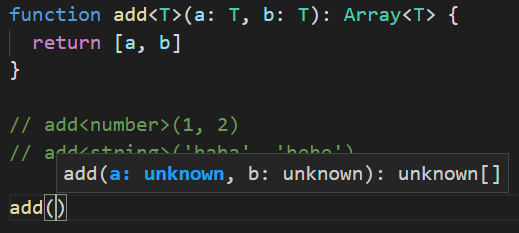
两种形式都是对的:
function add<T>(a: T, b: T): Array<T> {
  return [a, b]
}

// add<number>(1, 2)
// add<string>('haha', 'hehe')

add(1, 2)
add('haha', 'hehe')
2
3
4
5
6
7
8
9
14.2 多个参数 & 泛型约束
多个参数的情况:
// function sub<T, U>(a: T, b: U): (T | U)[] {
//   let arr: (T | U)[] = [a, b]
//   return arr
// }
// console.log(sub<number, boolean>(1, false))

function sub<T, U>(a: T, b: U): Array<T | U> {
  let arr: Array<T | U> = [a, b]
  return arr
}
sub<number, boolean>(1, false)
2
3
4
5
6
7
8
9
10
11
泛型约束:
T 没有继承时默认为
type T = {}。类型 T 要满足拥有 length 属性,需要继承具有 length 属性的类型
// function getLength<T extends { length: number }>(arg: T) {
//   return arg.length
// }

interface Len {
  length: number
}
function getLength<T extends Len>(arg: T) {
  return arg.length
}

console.log(getLength([2, 3])) // 2
console.log(getLength('hahaha')) // 6
// 泛型传递一个数字类型,给该数字强加一个 length 后,return arg.length 会报错,因为数字类型压根没有 length 属性的实现
// getLength(12) // 报错,数字类型没有 length 属性
2
3
4
5
6
7
8
9
10
11
12
13
14
15
15.泛型约束 & 泛型类
15.1 泛型约束 - keyof
案例引入:
function prop<T>(obj, key) {
  return obj[key]
}
let o = { a: 1, b: 2, c: 3 }
prop(o, 'a')
prop(o, 'd') // 这里不会报错!故此引入泛型约束概念
2
3
4
5
6
基本使用:
keyof 是用来获取 T 类型的所有键,它的返回类型是联合类型
// K 没有继承默认为 type K = {},继承后变成 type K = { a: string, b: string, c: string },即约束了 key 只拥有这三个属性
function prop<T, K extends keyof T>(obj: T, key: K) {
  return obj[key]
}
let o = { a: 1, b: 2, c: 3 }
prop(o, 'a')
prop(o, 'd') // 报错了!
2
3
4
5
6
7
15.2 泛型类
函数中的泛型的声明是在函数名之后,而泛型在类中的声明也是在类名之后
class Sub<T> {
  attr: T[] = []
  add(a: T): T[] {
    return [a]
  }
}
let s = new Sub<number>()
s.attr = [1, 2, 3, 4, 5]
let str = new Sub<string>()
str.attr = ['1', 'a', 'k']
console.log(s, str) // Sub { attr: [ 1, 2, 3, 4, 5 ] } Sub { attr: [ '1', 'a', 'k' ] }
2
3
4
5
6
7
8
9
10
11
16.tsconfig.json
16.1 配置详解
"compilerOptions": {
  "incremental": true, // TS编译器在第一次编译之后会生成一个存储编译信息的文件,第二次编译会在第一次的基础上进行增量编译,可以提高编译的速度
  "tsBuildInfoFile": "./buildFile", // 增量编译文件的存储位置
  "diagnostics": true, // 打印诊断信息
  "target": "ES5", // 目标语言的版本
  "module": "CommonJS", // 生成代码的模板标准
  "outFile": "./app.js", // 将多个相互依赖的文件生成一个文件,可以用在AMD模块中,即开启时应设置"module": "AMD",
  "lib": ["DOM", "ES2015", "ScriptHost", "ES2019.Array"], // TS需要引用的库,即声明文件,es5 默认引用dom、es5、scripthost,如需要使用es的高级版本特性,通常都需要配置,如es8的数组新特性需要引入"ES2019.Array",
  "allowJS": true, // 允许编译器编译JS,JSX文件
  "checkJs": true, // 允许在JS文件中报错,通常与allowJS一起使用
  "outDir": "./dist", // 指定输出目录
  "rootDir": "./", // 指定输出文件目录(用于输出),用于控制输出目录结构
  "declaration": true, // 生成声明文件,开启后会自动生成声明文件
  "declarationDir": "./file", // 指定生成声明文件存放目录
  "emitDeclarationOnly": true, // 只生成声明文件,而不会生成js文件
  "sourceMap": true, // 生成目标文件的sourceMap文件
  "inlineSourceMap": true, // 生成目标文件的inline SourceMap,inline SourceMap会包含在生成的js文件中
  "declarationMap": true, // 为声明文件生成sourceMap
  "typeRoots": [], // 声明文件目录,默认时node_modules/@types
  "types": [], // 加载的声明文件包
  "removeComments":true, // 删除注释
  "noEmit": true, // 不输出文件,即编译后不会生成任何js文件
  "noEmitOnError": true, // 发送错误时不输出任何文件
  "noEmitHelpers": true, // 不生成helper函数,减小体积,需要额外安装,常配合importHelpers一起使用
  "importHelpers": true, // 通过tslib引入helper函数,文件必须是模块
  "downlevelIteration": true, // 降级遍历器实现,如果目标源是es3/5,那么遍历器会有降级的实现
  "strict": true, // 开启所有严格的类型检查
  "alwaysStrict": true, // 在代码中注入'use strict'
  "noImplicitAny": true, // 不允许隐式的any类型
  "strictNullChecks": true, // 不允许把null、undefined赋值给其他类型的变量
  "strictFunctionTypes": true, // 不允许函数参数双向协变
  "strictPropertyInitialization": true, // 类的实例属性必须初始化
  "strictBindCallApply": true, // 严格的bind/call/apply检查
  "noImplicitThis": true, // 不允许this有隐式的any类型
  "noUnusedLocals": true, // 检查只声明、未使用的局部变量(只提示不报错)
  "noUnusedParameters": true, // 检查未使用的函数参数(只提示不报错)
  "noFallthroughCasesInSwitch": true, // 防止switch语句贯穿(即如果没有break语句后面不会执行)
  "noImplicitReturns": true, //每个分支都会有返回值
  "esModuleInterop": true, // 允许export=导出,由import from 导入
  "allowUmdGlobalAccess": true, // 允许在模块中全局变量的方式访问umd模块
  "moduleResolution": "node", // 模块解析策略,ts默认用node的解析策略,即相对的方式导入
  "baseUrl": "./", // 解析非相对模块的基地址,默认是当前目录
  "paths": { // 路径映射,相对于baseUrl
    // 如使用jq时不想使用默认版本,而需要手动指定版本,可进行如下配置
    "jquery": ["node_modules/jquery/dist/jquery.min.js"]
  },
  "rootDirs": ["src","out"], // 将多个目录放在一个虚拟目录下,用于运行时,即编译后引入文件的位置可能发生变化,这也设置可以虚拟src和out在同一个目录下,不用再去改变路径也不会报错
  "listEmittedFiles": true, // 打印输出文件
  "listFiles": true// 打印编译的文件(包括引用的声明文件)
}

// 指定一个匹配列表(属于自动指定该路径下的所有ts相关文件)
"include": [
   "src/**/*"
],
// 指定一个排除列表(include的反向操作)
 "exclude": [
   "demo.ts"
],
// 指定哪些文件使用该配置(属于手动一个个指定文件)
 "files": [
   "demo.ts"
]
2
3
4
5
6
7
8
9
10
11
12
13
14
15
16
17
18
19
20
21
22
23
24
25
26
27
28
29
30
31
32
33
34
35
36
37
38
39
40
41
42
43
44
45
46
47
48
49
50
51
52
53
54
55
56
57
58
59
60
61
62
63
16.2 compilerOptions 前的配置项
使用
tsc -init可以初始化生成 tsconfig.json 文件了
tsconfig.json:
{
  // 指定一个匹配列表(属于自动指定该路径下的所有 ts 相关文件)
  "include": [
    "src/**/*"
  ],
  // 指定一个排除列表(include 的反向操作)
  "exclude": [
    "demo.ts"
  ],
  // 指定哪些文件使用该配置(属于手动一个个指定文件)
  "files": [
    "demo.ts"
  ],

  // 不常用,继承 xx.json 的配置文件
  "extends": "./config/base"
}
2
3
4
5
6
7
8
9
10
11
12
13
14
15
16
17
16.3 compilerOptions 配置
其中
rootDir是更改根目录。例如,在 "outDir": "./dest" 配置情况下,src/index.ts 编译后输出位置为 dest/src/index.js。指定 rootDir: “src”。这样,根目录变成了 src,编译后输出则没有了 src 这一层
{
  "compilerOptions": {
    // 用来指定 ts 被编译的 es 版本
    "target": "ESNext",
    // 是否对 js 文件进行编译,默认是 false
    "allowJs": true,
    // 是否移除注释,默认 false
    "removeComments": true,
    // 编译文件的目录
    "rootDir": './src',
    // 指定编译后文件所在的目录
    "outDir": "./dist",
    // 代码源文件
    "source-map": true,
    // 所有严格检查的总开关,设置为 true 就能一键开启 4 个严格模式
  	"strict": true,
  }
}
2
3
4
5
6
7
8
9
10
11
12
13
14
15
16
17
18
17.namespace 命名空间
在工作中无法避免全局变量造成的污染,TypeScript 提供了 namespace 避免这个问题
- 内部模块,主要用于组织代码,避免命名冲突
- 命名空间内的类默认私有
- 通过
export暴露 - 通过
namespace关键字定义
17.1 全局变量污染的解决办法
同一个目录下,有 1.ts、2.ts,其中前者有代码
const a = 1,后者有代码const a = 2,这时候会发生报错,因为全局变量中有两个相同的变量
解决办法一:将其中一个 ts 文件的 a 变量进行导出,使之成为一个模块:export const a = 1
解决方法二:使用 namespace:
namespace A {
  export const a = 1
}
console.log(A.a) // 1
2
3
4
17.2 嵌套、抽离、别名、合并
namespace 嵌套:
namespace A {
  export namespace C {
    export const D = 5
  }
}
console.log(A.C.D) // 5
2
3
4
5
6
抽离 namespace:
a.ts:
export namespace B {
  export const a = 2
}
2
3
b.ts:
import { B } from './a'
console.log(B) // { a: 2 }
2
给 namespace 起别名:
namespace A {
  export namespace C {
    export const D = 5
  }
}
import AAA = A.C
console.log(AAA.D) // 5
2
3
4
5
6
7
命名空间的合并:
namespace A {
  export const b = 2
}
// 和 interface 一样,重名就会合并
namespace A {
  export const d = 3
}
console.log(A.b) // 2
console.log(A.d) // 3
2
3
4
5
6
7
8
9
18.三斜线指令
18.1 path="xxx.ts"
三斜线引用告诉编译器在编译过程中要引入的额外的文件。可以把它理解能
import,它可以告诉编译器在编译过程中要引入的额外的文件
基本使用:
1.ts:
namespace A {
  export const a = 1
}
2
3
2.ts:
///<reference path="1.ts" />
namespace A {
  export const c = 666
}
console.log(A.a) // 1
console.log(A.c) // 666
2
3
4
5
6
18.2 types="xxx.ts"
- 安装:
yarn add @types/node - 在 ts 文件中,可以引入上面安装的包:
///<reference types="node" />
19.声明文件
19.1 案例引入
tsconfig.json 设置了
"module": "CommonJS"
- 安装:
yarn add axios express - 引入成功:
import axios from 'axios' - 引入失败:
import express from 'express',提示:尝试使用npm i --save-dev @types/express(如果存在),或者添加一个包含declare module 'express';的新声明(.d.ts)文件
解决方法一:
- 根目录下创建 express.d.ts,里面写入:
declare var express:() => any
- index.ts 就可以调用了:
express()
解决方法二:
- 安装:
yarn add @types/express - index.ts 就可以调用了:
import express from 'express'
19.2 总结上面
npm 社区收录的 ts 声明文件的下载:npm (npmjs.com)open in new window
- axios 已经指定了声明文件 所以没有报错可以直接用。它已经通过语法 declare 暴露声明的 axios 对象:
declare const axios: AxiosStatic - 有一些第三方包没有声明文件,就可以去 npm 社区去寻找它的包。这里通过 vscoode 的提示可以知道,可以用 名称.d.ts 创建一个文件去声明,例如 express.d.ts(可以直接通过
yarn add @types/express去安装该声明文件)
20.Mixins 混入
20.1 对象混入
Object.assign 可以合并对象
interface Name {
  name: string
}
interface Age {
  age: number
}
interface Sex {
  sex: number
}

let a: Name = { name: 'yuanke' }
let b: Age = { age: 22 }
let c: Sex = { sex: 1 }

let obj = Object.assign(a, b, c)
2
3
4
5
6
7
8
9
10
11
12
13
14
15
20.2 类的混入
在 TypeScript 中,可以根据不同的功能定义多个可复用的类,它们将作为
mixins。因为extends只支持继承一个父类,我们可以通过implements来连接多个mixins,并且使用原型链连接子类的方法和父类的方法。就像组件拼合一样,由一堆细粒度的mixins快速搭建起一个功能强大的类
class A {
  type!: boolean
  changeType(): void {
    this.type = !this.type
  }
}

class B {
  name!: string
  getName(): string {
    return this.name
  }
}

// implement 是继承接口的,在这里将类作为接口使用
class C implements A, B {
  type: boolean = false
  name: string = 'yuanke'
  changeType!: () => void
  getName!: () => string
}

mixins(C, [A, B])
function mixins(curClas: any, itemCls: any[]) {
  itemCls.forEach(item => {
    Object.getOwnPropertyNames(item.prototype).forEach(name => {
      curClas.prototype[name] = item.prototype[name]
    })
  })
}

let ccc = new C()
console.log(ccc.type) // false
ccc.changeType()
console.log(ccc.type) // true
2
3
4
5
6
7
8
9
10
11
12
13
14
15
16
17
18
19
20
21
22
23
24
25
26
27
28
29
30
31
32
33
34
35
21.装饰器 Decorator
21.1 类装饰器
正常定义:
const watcher: ClassDecorator = (target: Function) => {
  target.prototype.getName = <T>(name: T): T => {
    return name
  }
}

@watcher
class A {

}

@watcher
class B {

}

let a = new A()
let b = new B()
console.log((<any>a).getName('123')) // 123
console.log((<any>b).getName('456')) // 456
2
3
4
5
6
7
8
9
10
11
12
13
14
15
16
17
18
19
20
类装饰器工厂:
const watcher = (name: string): ClassDecorator => {
  return (target: Function) => {
    target.prototype.getNames = () => {
      return name
    }
  }
}

@watcher('yuanke')
class A {

}

let a = new A()
console.log((<any>a).getNames()) // yuanke
2
3
4
5
6
7
8
9
10
11
12
13
14
15
组合式装饰器:
const watcher = (name: string): ClassDecorator => {
  return (target: Function) => {
    target.prototype.getNames = () => {
      return name
    }
  }
}

const log: ClassDecorator = (target: Function) => {
  target.prototype.a = 213
}

@log
@watcher('yuanke')
class A {
}

let a = new A()
console.log((<any>a).getNames()) // yuanke
2
3
4
5
6
7
8
9
10
11
12
13
14
15
16
17
18
19
21.2 类装饰器的应用
使用类装饰器实现统一消息响应:
const MessageDecorator: ClassDecorator = (target: Function) => {
  target.prototype.message = (content: string) => {
    console.log(content)
  }
}

@MessageDecorator
class LoginController {
  public login() {
    console.log('登陆业务处理')
    this.message('恭喜你,登录成功了')
  }
}
new LoginController().login()

@MessageDecorator
class ArticleController {
  public store() {
    this.message('文章添加成功')
  }
}
new ArticleController().store()
2
3
4
5
6
7
8
9
10
11
12
13
14
15
16
17
18
19
20
21
22
类装饰器工厂应用:
const MusicDecoratorFactory = (type: string): ClassDecorator => {
  console.log(type)
  switch (type) {
    case 'Tank':
      return (target: Function) => {
        target.prototype.playMusic = (): void => {
          console.log('播放劲爆音乐')
        }
      }
    default:
      return (target: Function) => {
        target.prototype.playMusic = (): void => {
          console.log('播放舒缓音乐')
        }
      }
  }
}

@MusicDecoratorFactory('Tank')
class Tank { }
const t = new Tank()
  ; (<any>t).playMusic()


@MusicDecoratorFactory('Player')
class Player {
}
new Player().playMusic()
2
3
4
5
6
7
8
9
10
11
12
13
14
15
16
17
18
19
20
21
22
23
24
25
26
27
28
21.3 方法装饰器
参数是什么:
const showDecorator: MethodDecorator = (...args: any[]) => {
  console.log(args) // 查看 args 的值
}
class User {
  @showDecorator
  public show() { }
}

// [
//   { show: [Function (anonymous)] },
//   'show',
//   {
//     value: [Function (anonymous)],
//     writable: true,
//     enumerable: true,
//     configurable: true
//   }
// ]
2
3
4
5
6
7
8
9
10
11
12
13
14
15
16
17
18
21.4 方法装饰器的应用
使用装饰器实现文本高亮
1.html:
<!DOCTYPE html>
<html lang="en">

<head>
  <meta charset="UTF-8">
</head>

<body>
  <script src="./1.js"></script>
</body>

</html>
2
3
4
5
6
7
8
9
10
11
12
1.ts:
const highlightDecorator: MethodDecorator = (target: Object, propertyKey: string | symbol,
descriptor: PropertyDescriptor) => {
  const method = descriptor.value
  descriptor.value = () => {
    return `<div style="color:red;">${method()}</div>`
  }
}

class User {
  @highlightDecorator
  public response() {
    return 'houdunren.com'
  }
}

console.log(new User().response()) // <div style="color:red;">houdunren.com</div>
document.body.insertAdjacentHTML('beforeend', new User().response())
2
3
4
5
6
7
8
9
10
11
12
13
14
15
16
17
装饰器工厂控制延迟时间:
// const sleepDecorator: MethodDecorator = (target: xxxx, descriptor: xxxx) => {}
const sleepDecorator = (times: number): MethodDecorator => {
  return (...args: any[]) => {
    const [, , descriptor] = args
    // 延迟 2s 后执行方法
    const method = descriptor.value
    descriptor.value = () => {
      setTimeout(() => {
        method()
      }, times);
    }
  }
}

class User {
  @sleepDecorator(2000)
  public response() {
    console.log('houdunren')
  }
}

new User().response()
2
3
4
5
6
7
8
9
10
11
12
13
14
15
16
17
18
19
20
21
22
21.5 属性装饰器 & 参数装饰器
属性装饰器:
- 属性装饰器的第一个参数 target,如果我们是给静态属性添加的属性装饰器,那么 target 就是构造函数,如果是普通属性,那么 target 就是原型对象
- 属性装饰器的第二个参数 propertyKey 是属性名称
const LowerDecorator: PropertyDecorator = (target: Object, propertyKey: string | symbol) => {
  Object.defineProperty(target, propertyKey, {
    get: () => {
      return '后盾人'
    }
  })
}

class Hd {
  @LowerDecorator
  public static title: string | undefined
  @LowerDecorator
  public noStaticName: string | undefined
}

console.log(Hd.title) // 后盾人
console.log(new Hd().noStaticName) // 后盾人
2
3
4
5
6
7
8
9
10
11
12
13
14
15
16
17
参数装饰器:
- 第一个参数与上同,第二个参数是参数所在的方法的名称,第三个是参数所在的位置
const ParamsDecorator: ParameterDecorator = (...args: any[]) => {
  console.log(args)
  // [ {}, 'show', 1 ]
}

class Hd {
  public show(id: number = 1, @ParamsDecorator content: string) {}
}
2
3
4
5
6
7
8
4.14 属性装饰器的应用
将属性值变小写:
const LowerDecorator: PropertyDecorator = (target: Object, propertyKey: string | symbol) => {
  let value: string
  Reflect.defineProperty(target, propertyKey, {
    get() {
      return value.toLowerCase()
    },
    set(v) {
      value = v
    }
  })
}

class Hd {
  @LowerDecorator
  public title: string | undefined
}

const obj = new Hd()
obj.title = 'HouDunRen'
console.log(obj.title) // houdunren
2
3
4
5
6
7
8
9
10
11
12
13
14
15
16
17
18
19
20
创建随机色块:
const RandomColorDecorator: PropertyDecorator = (target: object, PropertyKey: string | symbol) => {
  const colors: string[] = ['red', 'blue', 'yellow', 'green', '#383838']
  Reflect.defineProperty(target, PropertyKey, {
    get() {
      return colors[Math.floor(Math.random() * colors.length)]
    }
  })
}

class Hd {
  @RandomColorDecorator
  public color: string | undefined

  public draw() {
    document.body.insertAdjacentHTML('beforeend',
      `<div style="height: 200px;width: 200px;background-color :${this.color}">houdunren.com</div>`
    )
  }
}

new Hd().draw()
2
3
4
5
6
7
8
9
10
11
12
13
14
15
16
17
18
19
20
21
22.打包操作
22.1 Rollup 构建 TS 项目
rollup 插件:rollup/awesome: ⚡️ Delightful Rollup Plugins, Packages, and Resources (github.com)open in new window
前期准备:
- 初始化:
yarn init -y、tsc --init - 安装 Rollup:
yarn global add rollup - 新建 public 和 src 目录,前者添加 index.html,后者添加 index.ts
- 新建 rollup.config.js
- 安装 typescript:
yarn add typescript - 安装 TypeScript 转换器:
yarn add rollup-plugin-typescript2 - 安装代码压缩插件:
yarn add rollup-plugin-terser - 安装 rollupweb 服务:
yarn add rollup-plugin-serve - 安装热更新:
yarn add rollup-plugin-livereload - 安装外部依赖:
yarn add rollup-plugin-node-resolve - 安装配置环境变量用来区分本地和生产:
yarn add cross-env - 替换环境变量给浏览器使用:
yarn add rollup-plugin-replace
配置 package.json:
-c:启用配置文件、-w:实时监控
{
  "name": "typescript",
  "version": "1.0.0",
  "main": "index.js",
  "license": "MIT",
  "scripts": {
    "dev": "cross-env NODE_ENV=development rollup -c -w",
    "build": "cross-env NODE_ENV=production rollup -c"
  },
  "dependencies": {
    "cross-env": "^7.0.3",
    "rollup-plugin-livereload": "^2.0.5",
    "rollup-plugin-node-resolve": "^5.2.0",
    "rollup-plugin-replace": "^2.2.0",
    "rollup-plugin-serve": "^1.1.0",
    "rollup-plugin-terser": "^7.0.2",
    "rollup-plugin-typescript2": "^0.31.2",
    "typescript": "^4.6.4"
  }
}
2
3
4
5
6
7
8
9
10
11
12
13
14
15
16
17
18
19
20
配置 rollup.config.js
console.log(process.env) // yarn dev 后打印 development,yarn build 后打印 production
import path from 'path'
import ts from 'rollup-plugin-typescript2'
import serve from 'rollup-plugin-serve'
import livereload from 'rollup-plugin-livereload'
import { terser } from 'rollup-plugin-terser'
import replace from 'rollup-plugin-replace'
const isDev = () => {
  return process.env.NODE_ENV === 'development'
}

export default {
  input: './src/index.ts',
  output: {
    file: path.resolve(__dirname, './lib/index.js'),
    format: 'umd',
    // tsconfig.json 也要开同名选项
    sourcemap: true
  },
  plugins: [
    // 支持 ts 转化
    ts(),
    // 热更新
    isDev() && livereload(),
    // 压缩代码
    terser({
      compress: {
        // 帮助删除 console.log() 内容
        drop_console: true
      }
    }),
    // 将 nodejs 里的 process.env 注册到浏览器,使浏览器也能使用
    replace({
      'process.env.NODE_ENV': JSON.stringify(process.env.NODE_ENV)
    }),
    // 开启本地服务
    isDev() && serve({
      open: true,
      port: 1988,
      openPage: '/public/index.html'
    })
  ]
}
2
3
4
5
6
7
8
9
10
11
12
13
14
15
16
17
18
19
20
21
22
23
24
25
26
27
28
29
30
31
32
33
34
35
36
37
38
39
40
41
42
43
22.2 webpack 构建 TS 项目
安装依赖:
- 安装 webpack:
yarn add webpack webpack-cli - 编译 TS:
yarn add ts-loader - 热更新服务:
yarn add webpack-dev-server - HTML 模板:
yarn add html-webpack-plugin - 安装 typescript:
yarn add typescript
package.json 配置:
{
  "name": "typescript",
  "version": "1.0.0",
  "main": "index.js",
  "license": "MIT",
  "scripts": {
    "dev": "webpack-dev-server",
    "build": "webpack"
  },
  "dependencies": {
    "html-webpack-plugin": "^5.5.0",
    "ts-loader": "^9.3.0",
    "typescript": "^4.6.4",
    "webpack": "^5.72.0",
    "webpack-cli": "^4.9.2",
    "webpack-dev-server": "^4.9.0"
  }
}
2
3
4
5
6
7
8
9
10
11
12
13
14
15
16
17
18
webpack.config.js 配置:
const path = require('path')
const htmlwebpackplugin = require('html-webpack-plugin')
module.exports = {
  entry: './src/index.ts',
  output: {
    path: path.resolve(__dirname, './dist'),
    filename: 'index.js'
  },
  module: {
    rules: [
      {
        test: /\.ts$/,
        use: 'ts-loader'
      }
    ]
  },
  devServer: {
    port: 1988
  },
  resolve: {
    extensions: ['.js', '.ts']
  },
  plugins: [
    new htmlwebpackplugin({
      template: './public/index.html'
    })
  ],
  mode: 'development'
}
2
3
4
5
6
7
8
9
10
11
12
13
14
15
16
17
18
19
20
21
22
23
24
25
26
27
28
29
23.编写发布订阅模式
23.1 代码
看懂就很牛了
interface Evenet {
  on: (name: string, fn: Function) => void
  emit: (name: string, ...args: Array<any>) => void
  off: (name: string, fn: Function) => void
  once: (name: string, fn: Function) => void
}

interface List {
  [key: string]: Array<Function>
}

class Dispatch implements Evenet {
  list: List
  constructor() {
    this.list = {}
  }
  // on 的作用就是将函数作为 value 推入数组中,第一个参数为 key 值
  on(name: string, fn: Function) {
    // list 格式:list: { name: [fun1, fun2, ...] }
    const callback = this.list[name] || []
    callback.push(fn)
    // 将新增了 fn 的数组覆盖到原数组中
    this.list[name] = callback
  }

  // emit 的作用是:执行被推入的函数
  emit(name: string, ...args: Array<any>) {
    let eventName = this.list[name]
    if (eventName) {
      eventName.forEach(fn => {
        fn.apply(this, args)
      })
    } else {
      console.error(`名称错误${name}`)
    }
  }
  off(name: string, fn: Function) {
    let eventName = this.list[name]
    if (eventName && fn) {
      let index = eventName.findIndex(fns => fns === fn)
      eventName.splice(index, 1)
      console.log(eventName)
    } else {
      console.error(`名称错误${name}`)
    }
  }
  once(name: string, fn: Function) {
    let de = (...args: Array<any>) => {
      fn.apply(this, args)
      this.off(name, de)
    }
    this.on(name, de)
  }
}

const o = new Dispatch()
o.on('post', (...args: Array<any>) => {
  console.log(args, 1)
})

// const fn = (...args: Array<any>) => {
//   console.log(args, 2)
// }
// o.on('post', fn)

// o.off('post', fn)

o.once('post', (...args: Array<any>) => {
  console.log(args, 'once')
})
o.emit('post', 1, false, { name: 'yuanke' })
o.emit('post', 2, true, { name: 'yuanke' })
2
3
4
5
6
7
8
9
10
11
12
13
14
15
16
17
18
19
20
21
22
23
24
25
26
27
28
29
30
31
32
33
34
35
36
37
38
39
40
41
42
43
44
45
46
47
48
49
50
51
52
53
54
55
56
57
58
59
60
61
62
63
64
65
66
67
68
69
70
71
72
24.进阶
24.1 proxy & Reflect
基本的使用
type Person = {
  name: string,
  age: number,
  text: string
}

// 哎,这里还是用了两个 any,不知道有没有大神能去掉这俩 any?
const proxy = (object: any, key: any) => {
  return new Proxy(object, {
    get(target, prop, receiver) {
      console.log('=====>get', prop)
      return Reflect.get(target, prop, receiver)
    },
    set(target, prop, value, receiver) {
      console.log('=====>set', prop)
      return Reflect.set(target, prop, value, receiver)
    }
  })
}

const logAccess = <T>(object: T, key: keyof T): T => {
  return proxy(object, key)
}

let man: Person = logAccess({
  name: 'yuanke',
  age: 22,
  text: '太空人'
}, 'name')

let man2 = logAccess({
  name: 'yuanke2'
}, 'name')

man.age = 30 // =====>set age
console.log(man.age) // =====>get age \n 30
2
3
4
5
6
7
8
9
10
11
12
13
14
15
16
17
18
19
20
21
22
23
24
25
26
27
28
29
30
31
32
33
34
35
36
24.2 Partial & Pick
Partial 源码:
作用:将某个类型的所有属性值设置为可选
type Partial<T> = {
  // p in keyof T  ===>  p 为 `type key = 'name' | 'age' | 'text'` 的联合类型的遍历的成员
  // p 可以为 'name'、'age'、'text'
  // T 在这里为 Person
  [P in keyof T]?: T[P]
}
2
3
4
5
6
Pick 源码:
将某个类型的一个或多个属性摘出来作为一个新的类型
type Pick<T, K extends keyof T> = {
  [P in K]: T[P]
}
2
3
使用 Partial 处理过后:
type Person = {
  name: string,
  age: number,
  text: string
}

type p = Partial<Person>
// 处理过后的 p:
// type p = {
//   name?: string | undefined;
//   age?: number | undefined;
//   text?: string | undefined;
// }
2
3
4
5
6
7
8
9
10
11
12
13
使用 Pick 处理过后:
type Person = {
  name: string,
  age: number,
  text: string
}
type p = Pick<Person, 'age' | 'name'>

// 处理过后
// type p = {
//   age: number
//   name: string
// }
2
3
4
5
6
7
8
9
10
11
12
24.3 Record & Readonly
Readonly 源码:
作用:将某个类型的所有属性设置为 readonly
type Readonly<T> = {
  readonly [P in keyof T]: T[P]
}
2
3
Record 源码:
type Record<K extends keyof any, T> = {
  [P in K]: T
}

// keyof any 会返回以下的联合类型
// type key = string | number | symbol
2
3
4
5
6
使用 Readonly 处理过后:
type R<T> = {
  readonly [P in keyof T]: T[P]
}

type Person = {
  name: string,
  age: number,
  text: string
}

type man = R<Person> // 类似 Array<string>

// man 的类型变成:
// type man = {
//   readonly name: string
//   readonly age: number
//   readonly text: string
// }
2
3
4
5
6
7
8
9
10
11
12
13
14
15
16
17
18
使用 Record 处理过后:
type Person = {
  name: string,
  age: number,
  text: string
}
type K = 'A' | 'B' | 'C'
type B = Record<K, Person>

// 类型 B 如下:
// type B = {
//   A: Person
//   B: Person
//   C: Person
// }

let obj:B = {
  A: { name: 'yuanke', age: 22, text: 'haha' },
  B: { name: 'hryh', age: 23, text: 'df' },
  C: { name: 'dfg', age: 24, text: 'hasfsaha' }
}
2
3
4
5
6
7
8
9
10
11
12
13
14
15
16
17
18
19
20
24.4 infer
定义一个类型,如果是数组类型就返回数组元素的类型,否则就传入什么类型,就返回什么类型
传统做法:定义一个泛型 T,使之继承数组类型,如果 T 真为数组,则返回数组成员,否则返回 T 原类型本身
type TYPE<T> = T extends Array<any> ? T[number] : T
type A = TYPE<string[]> // type A = string
type B = TYPE<(string | number)[]> // type B = string | number
type C = TYPE<boolean> // type C = boolean
2
3
4
infer 做法:
// infer 起到占位符的作用,一般用到 extends 后面。其中 U 表示数组本身
type TYPE<T> = T extends Array<infer U> ? U : T
type A = TYPE<string[]> // type A = string
type B = TYPE<(string | number)[]> // type B = string | number
type C = TYPE<boolean> // type C = boolean
2
3
4
5
infer 妙用:将元祖类型转为联合类型:
// infer 妙用:将元祖类型转为联合类型
// U 为 string 且 number 都要存在,故被解析为了联合类型 |
type TYPE<T> = T extends Array<infer U> ? U : never

type T = [string, number]

type uni = TYPE<T>
2
3
4
5
6
7